Showing posts with label Samsung. Show all posts
Showing posts with label Samsung. Show all posts
Friday, December 4, 2015
[Support] Samsung Galaxy S6 Edge G9250
Android 5.1.1 Firmware is now available for Samsung Galaxy S6 Edge SM-G9250.The users can also update their device to this new firmware through Samsung Kies or OTA (Over the Air). It is always recommended to update your device with the latest firmware to fixes bugs in previous version.
Below is the Link to Download Stock Firmware..File Contains Binary/Flash Files.
Below is the Link to Download Stock Firmware..File Contains Binary/Flash Files.
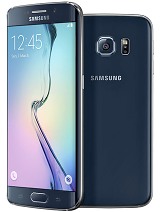
Model SM- G9250
Android OS,v5.1.1
Quad Core 1.5 Ghz.
16 GB ,3 GB Ram.
5.1 Inches Screen.
16 MP Camera,LED Flash.
Country- Hong Kong
How to Flash
Step 1:-Download and extract the firmware on your computer.
Step 2:-Open the Odin / One Key Downloader and load the Scatter / Binary File from the Folder.
Step 3:-Connect your Smartphone to computer using the USB Cable.
Step 4:-Click on Upgrade / Download Button in SP Flash Tool / Odin to Begin the Flashing.
Step 5:- Green Ring Will appear at the end of successful Flash.
Warning:- *Flashing Stock Rom is always a data loss procedure.So, always take backup of your personal data before Flashing the Stock Rom.


[Support] Samsung Galaxy J7 Firmware Android 5.1.1
Android 5.0 Firmware is now available for Samsung Galaxy Galaxy J7.The users can also update their device to this new firmware through Samsung Kies or OTA (Over the Air). It is always recommended to update your device with the latest firmware to fixes bugs in previous version.
Below is the Link to Download Stock Firmware..File Contains Binary/Flash Files.
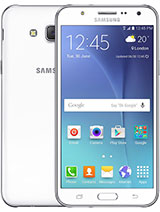
Device Name : Samsung Galaxy J7
Device Model : SM-J700F
Date Update : XXXXXX
Region Country : Unknow
Firmware Version : J700FXXU1AOG6
OS Name : Lollipop
OS Version : 5.1.1
Step 1:-Download and extract the firmware on your computer.
Step 2:-Open the Odin and load the Scatter / Binary File from the Folder.
Step 3:-Connect your Smartphone to computer using the USB Cable.
Step 4:-Click on Upgrade / Download Button in SP Flash Tool / Odin to Begin the Flashing.
Step 5:- Green Ring Will appear at the end of successful Flash.


Warning:- *Flashing Stock Rom is always a data loss procedure.So, always take backup of your personal data before Flashing the Stock Rom.
Below is the Link to Download Stock Firmware..File Contains Binary/Flash Files.
Device Name : Samsung Galaxy J7
Device Model : SM-J700F
Date Update : XXXXXX
Region Country : Unknow
Firmware Version : J700FXXU1AOG6
OS Name : Lollipop
OS Version : 5.1.1
Pre Requisites:
Before proceeding to update. we recommend to backup all your device data and settings to restore later when you need that. However, official firmware restore all previous data but if your device get stuck at bootloop issue or fall into any error, the backup file will help you to restore all your data.
- Check your device battery percentage, make sure that your device have at least 60% battery power
- Backup all your device data and settings to external storage
- Check that USB Debugging is Enabled on your device, otherwise it is not possible to connect and transfer files between PC and Samsung Galaxy J7 via USB
- Install USB Driver for Samsung Galaxy J7 on your PC
How to Flash
Step 1:-Download and extract the firmware on your computer.
Step 2:-Open the Odin and load the Scatter / Binary File from the Folder.
Step 3:-Connect your Smartphone to computer using the USB Cable.
Step 4:-Click on Upgrade / Download Button in SP Flash Tool / Odin to Begin the Flashing.
Step 5:- Green Ring Will appear at the end of successful Flash.
Warning:- *Flashing Stock Rom is always a data loss procedure.So, always take backup of your personal data before Flashing the Stock Rom.
Upload by droiddownloadca,please do not port/kang with out author's permissiom
If it is working and not working for you leave a comment and don't forget to like our Facebook Page
If it is working and not working for you leave a comment and don't forget to like our Facebook Page
Thursday, December 3, 2015
[Support] Samsung SM-G900S(Lollipop) Firmware

Below is the Link to Download Stock Firmware..File Contains Binary/Flash Files.
Dual Sim.
Android OS,v5.0.2.
Quad Core 2.5 Ghz.
16 GB ,1 GB Ram.
5.1 Inches Screen.
16 MP Camera,LED Flash.
Android OS,v5.0.2.
Quad Core 2.5 Ghz.
16 GB ,1 GB Ram.
5.1 Inches Screen.
16 MP Camera,LED Flash.
How to Flash
Step 1:-Download and extract the firmware on your computer.
Step 2:-Open the SP FLASH TOOL / One Key Downloader and load the Scatter / Binary File from the Folder.
Step 3:-Connect your Smartphone to computer using the USB Cable.
Step 4:-Click on Upgrade / Download Button in SP Flash Tool / Odin to Begin the Flashing.
Step 5:- Green Ring Will appear at the end of successful Flash.
Flash Process instructions with Images
Warning:- *Flashing Stock Rom is always a data loss procedure.So, always take backup of your personal data before Flashing the Stock Rom.
[Support] Samsung Galaxy S5 SM-G900R6 5.0 Lollipop Firmware
Android 5.1.1 Firmware is now available for Samsung Galaxy S6 Edge SM-G9250.The users can also update their device to this new firmware through Samsung Kies or OTA (Over the Air). It is always recommended to update your device with the latest firmware to fixes bugs in previous version.
Below is the Link to Download Stock Firmware..File Contains Binary/Flash Files.
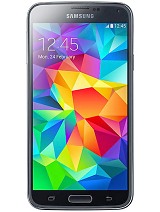
Device Name : Samsung Galaxy S5 SM-G900R6
Device Model : SM-G900R6
Date Update : 2015-02-10
Region Code : LRA
Region Country : Unknow
Firmware Version : G900R6WWU2BOB3
OS Name : Lollipop
OS Version : 5.0
Change List : 4173671
Before proceeding to update. we recommend to backup all your device data and settings to restore later when you need that. However, official firmware restore all previous data but if your device get stuck at bootloop issue or fall into any error, the backup file will help you to restore all your data.
- Check your device battery percentage, make sure that your device have at least 60% battery power
- Backup all your device data and settings to external storage
- Check that USB Debugging is Enabled on your device, otherwise it is not possible to connect and transfer files between PC and Samsung Galaxy S5 SM-G900R6 via USB
- Install USB Driver for Samsung Galaxy S5 SM-G900R6 on your PC
How to Flash
Step 1:-Download and extract the firmware on your computer.
Step 2:-Open the Odin and load the Scatter / Binary File from the Folder.
Step 3:-Connect your Smartphone to computer using the USB Cable.
Step 4:-Click on Upgrade / Download Button in SP Flash Tool / Odin to Begin the Flashing.
Step 5:- Green Ring Will appear at the end of successful Flash.

Warning:- *Flashing Stock Rom is always a data loss procedure.So, always take backup of your personal data before Flashing the Stock Rom.
[Support] Samsung GT-6810P(Updated Link) Firmware

Below is the Link to Download Stock Firmware..
Pre-Requisite For Download.
Downloader Program Flash Tool
Data Cable.
Binary File.
GT-6810P Mobile.
How to Flash
Step 1:-Download and extract the firmware on your computer.
Step 2:-Open the Flash Tool / One Key Downloader and load the Scatter / Binary File from the Folder.
Step 3:-Connect your Smartphone to computer using the USB Cable.
Step 4:-Click on Upgrade / Download Button in SP Flash Tool / Odin to Begin the Flashing.
Step 5:- Green Ring Will appear at the end of successful Flash.
Warning:- Flashing Stock Rom is always a data loss procedure.So, always take backup of your personal data before Flashing the Stock Rom.

[Support] Samsung GT-S5360 Firmware (Updated Link)

Below is the Link to Download Stock Firmware..
Pre-Requisite For Download.
Downloader Program Odin_v1.84.
Data Cable.
Binary File.
S5360 Mobile.
How to Flash
Step 1:-Download and extract the firmware on your computer.
Step 2:-Open the Odin_v1.84 / One Key Downloader and load the Scatter / Binary File from the Folder.
Step 3:-Connect your Smartphone to computer using the USB Cable.
Step 4:-Click on Upgrade / Download Button in SP Flash Tool / Odin to Begin the Flashing.
Step 5:- Green Ring Will appear at the end of successful Flash.
How To Download :- Click On Download Button and Redirection to Download Page.
You pay what you can afford for droiddownloadca.
I'll send you a thank you note for paying -- and more, if you pay more.
Ten percent of your payment goes to charity.
You pay what you can afford for droiddownloadca.
I'll send you a thank you note for paying -- and more, if you pay more.
Ten percent of your payment goes to charity.
Version- XXKK5_OXEKK1 
Version- XXLG2_ITVLHHV 
Version-XXLK3_OXKLB1
Software Flash Process
If it is working and not working for you leave a comment and don't forget to like our Facebook Page
Warning:- Flashing Stock Rom is always a data loss procedure.So, always take backup of your personal data before Flashing the Stock Rom.
Subscribe to:
Posts (Atom)